
Canvas App Rewrite with Github Copilot and Spec Driven Development
Jul 28, 2026
⚡ TL;DR: I used the GitHub Copilot CLI and the Power Platform Skills plugin to extract the business logic from an existing Canvas App, plan its migration , and generate implementation-ready specs.
💡 Rewriting a Canvas App: Idea, Challenge, Solution
Last week, I decided to rewrite a Canvas App I have been running for 5 years. It is a simple application for Airbnb Hosts Admins that helps them manage their operations.
I wanted to accelerate the migration with GitHub Copilot; ideally, I would be able to connect with the Power Platform to extract and document current business rules and logic, and use that documentation as the starting point on my Spec Driven Development... Enter the Power Platform Skills/Plugin.
This post walks through my experience rewriting a Canvas App using GitHub Copilot CLI, the Power Platform Skills/Plugin, and Spec Driven Development, highlighting the tools, techniques, and lessons learned along the way.
🔌 Connecting to your Canvas App
In order to enable the Power Platform Plugin, you first need to install it:
- Add the marketplace:
/plugin marketplace add microsoft/power-platform-skills - Install the Canvas Apps related skills:
/plugin install canvas-apps@power-platform-skills
Read the documentation for all the availabel skills.
With the installed skills, the next step is to connect to your Canvas App, you will need the Environment ID and App ID, then simply run this prompt:
Connect to canvas app id: XXXX and env id: YYYYThis will bring up an authentication window, sign in with your credentials, to complete the connection to your Canvas App.
🔍 Extracting Business Rules, Models and Logic
I continue with the same session so I don't lose the connection to the Canvas App, and run this prompt:
Extract all business and functional requirements from this app:
  I want to create documentation on what it does, the data sources, and any metadata required
  to fully understand what the app does so I can eventually migrate it to another platform.

  Do not write any code or suggest target architectures or stack, for now, simply
  write as many document needed to get a full picture of what this app is all about.

  Specifically write one file for the data model, including a ER diagram.

  Put all documentation on a `\docs\initial\` folder.

  After you are done, use Cloud Opus 4.8 to validate your results.
  Loop through critique/updates until you are satisfied everything is considered.
Things to notice 👀:
- I used Chat GPT 5.6 (Sol) as the main model
- I explicitly ask the Copilot to review and collaborate with Claude Opus 4.8 (explicit rubberduck)
- I am being explicit on what my intent is (migration), but at the same time I am giving the model some freedom (write as many files as you need)
The results are very comprehensive, with a series of documents describing the application, but also a file dedicated to open questions and validations.
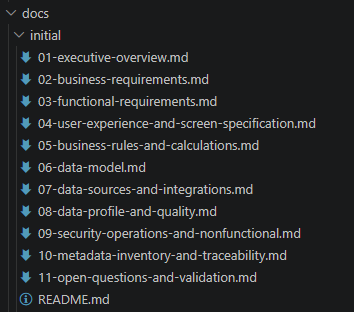
I take time to review the documents, ensure everything looks right, I answer all open questions and validations and iterate with the agent to refine and improve the output.
🗺️ Planning First!
Now that I have a solid starting point in terms of documentation, I can move to planning. Since I have all documentation on files, I start a brand new session, that way, I don't carry over unnecessary context (and save tokens).
As always, I start in Plan Mode with the following prompt:
The documents on @docs\initial\ describes an application that is running
    as a canvas app in the power platform. I want to migrate this to Blazor Server, with an SQL Server backend.
    The users will loging with their google account.

    Help me plan this migration, I want a detail plan, including scaffolding, implementation and data migration.
    I would like to use the https://www.fluentui-blazor.net/, and follow a typical Administration site design.
Things to notice 👀:
- I used Chat GPT 5.6 (Sol) as the main model
- Eventhough I did not ask for a rubberduck review, copilot still did it:

- Again, I am being explicit on what my intent is, specifically the tech stack and frameworks I want to use, but I am not very opinionated and let the agent do the work.
The result is a very comprehensive plan for this migration. I take the time to review it, make adjustments, and ensure it aligns with my vision. Then I keep moving.
📝 Let's get Spec'ing
Once again I start a new session to avoid unnecessary context carry overs (did I mention it saves tokens?). All I need at this moment is on my plan file.
My next step will be to create Issues and Sub-Issues on GitHub so I can later track progress and manage development, so I switch to Autopilot mode and continue wit this prompt:
I want to implement the @initial-plan.md:
    Please go through it and create issues in GitHub.
    Plan it in a way where there are Top level issues and sub-issues.
    Plan it in a way that I can implement them sequentially.
    Tje repo has a project called `Airbnb-Admin` where the issues should go.

    When you have a propose issues/sub-issues ready, ask Claude Opus 4.8 to review your plan
    and work with the results to make the plan better.

    Create as many issues and sub-issues as required and make sure you include sufficient details for implementation.
Things to notice (common patterns emerging...) 👀:
- I used Chat GPT 5.6 (Sol) as the main model
- I expicitly ask the Copilot to review and collaborate with Claude Opus 4.8 (explicit rubberduck)
- I am being explicit on what my intent is.
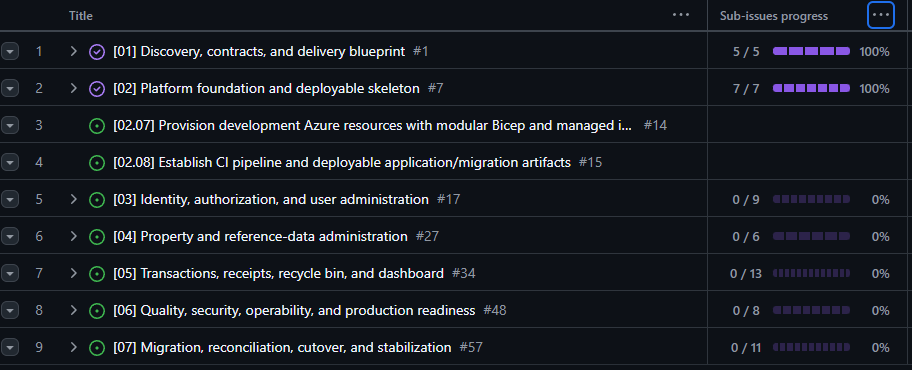
The result is a well-structured set of issues and sub-issues that I can follow to implement the migration. As always, I review the results; it is important that my specs are clear and complete, since all code will be generated from them.
🚀 Ready for Development!
From this point forward, the process is simply:
- Implement Issue
- Run app and Review
- Create PR
- Have PR reviewed by Copilot (and resolve issues found)
- Ensure all CI/CD gates pass
- Merge PR
- repeat...
So, for each top level issue, I start a new session, continue in Autopilot mode with a simple prompt like this:
Work through issue # 1 with all its sub-issues.
    Update the status on the board as you go.
... Then I go for Coffee ☕ ...
Things to notice 👀:
- Because my specs are in great shape, I change my model to use Claude Sonnet 4.5, which is more than capable of developing the required features (and saves me tokens).
- My intent is cleary defined on my specs, which are defined in the Issues.
✅ Process Summary
5-Steps to get you there:
- Install the Plugin
- Extract Business Rules, Models and Logic
- Plan the migration
- Spec! Create Issues and Sub-Issues on GitHub
- Implement each Issue
This process worked great for me, and I am confident it can work for you too. The key is to be explicit about your intent, and to leverage the power of GitHub Copilot and Spec Driven Development to accelerate your Canvas App migration.